






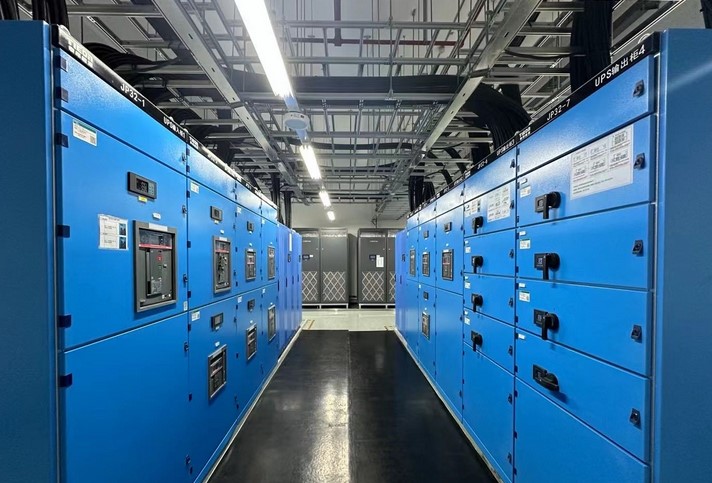
It’s 2:00 AM, and a sudden summer storm decides to play havoc with the local power grid. In an instant, the hum of your home office dies. The silent, blinking lights of your server rack go dark. For most, it’s an inconvenience. For someone running a home-based business or managing a sophisticated smart home, it’s a data-loss catastrophe and a breach of security.
In my fifteen years of crawling through crawlspaces and auditing high-end home electrical systems, I’ve seen this script play out too many times. Most homeowners think a surge protector is enough. It’s not. A surge protector is a shield, but backup battery power is your life support system.
If you want to move beyond “hoping the lights stay on” and into the realm of professional-grade reliability, you need to understand the mechanics of uptime.
Why “Wait and See” is a Dangerous Strategy for Your Home
We live in an era where our homes are essentially mini-data centers. Between mesh Wi-Fi networks, smart security cameras, and NAS (Network Attached Storage) drives, a 5-second power flicker can cause a 30-minute reboot cycle—or worse, corrupted firmware.
Think of your home’s electricity like a water pipeline. A power outage isn’t just the water stopping; it’s a sudden vacuum that can rattle the pipes. Backup battery power acts as a pressurized reserve tank, ensuring the flow never actually hits zero, even when the main line fails.
The Cost of “Dirty” Power
Most people don’t realize that outages aren’t the only enemy. “Brownouts” (drops in voltage) and “Sags” are silent killers of sensitive electronics. In my experience, more appliances are fried by the voltage spikes that occur the moment power is restored than by the outage itself. A dedicated battery backup conditions the power, delivering a “Pure Sine Wave” that keeps your components cool and happy.
Choosing Your Arsenal: UPS vs. Solar Battery Storage
Not all backup solutions are created equal. Depending on whether you’re trying to save a Word document or keep your refrigerator running for three days, your hardware choices will vary significantly.
1. The Uninterruptible Power Supply (UPS)
For the beginner-to-intermediate user, the UPS is the first line of defense. This is a compact unit that sits between your wall outlet and your devices.
-
Standby UPS: The entry-level choice. It waits for the power to fail before switching to battery. There is a tiny “transfer time” (measured in milliseconds) that most modern computers can handle.
-
Line-Interactive UPS: My personal recommendation for home offices. It has a transformer that can handle minor voltage fluctuations without draining the battery.
-
Online Double Conversion: The “Gold Standard.” It constantly runs your gear off the battery while simultaneously charging it. There is zero transfer time.
2. Whole-Home Battery Clusters
If you are looking at “Critical Infrastructure” in a literal sense—sump pumps, medical equipment, or HVAC—you are looking at LiFePO4 (Lithium Iron Phosphate) stacks. These are essentially giant versions of your phone battery that can power a house for hours or days.
The Technical Blueprint: Sizing Your Backup Battery Power
One of the most common mistakes I see is “under-sizing.” A homeowner buys a cheap UPS, plugs in a gaming PC and two monitors, and wonders why the battery died in 120 seconds.
To do this right, you need to calculate your Total Load (Volt-Amps or Watts).
Step-by-Step Calculation
-
List your critical devices: Router, Modem, PC, and one monitor.
-
Check the labels: Look for the wattage (W) or Amps (A).
-
The 25% Rule: Always add a 25% “headroom” to your total calculation. Batteries lose efficiency over time; you don’t want to start at 100% capacity on day one.
Pro Tip: Don’t plug your laser printer into a battery backup. Laser printers pull a massive amount of “Inrush Current” when they heat up, which will instantly trip the circuit breaker on most consumer-grade UPS units.
Installation Insights: Where Most DIYers Fail
I’ve walked into multi-million dollar homes where the “critical” server was plugged into a battery backup that was itself plugged into a cheap, daisy-chained power strip. This is a recipe for a fire, not uptime.
Thermal Management is Key
Batteries hate heat. If you tuck your backup battery power unit into a tight, unventilated cabinet, you are cutting its lifespan in half. Lead-acid batteries (found in cheaper UPS units) can outgas, and Lithium units can throttle their output if they get too hot. Keep your backup units in a cool, dust-free environment with at least 3 inches of clearance on all sides.
The “Silent” Battery Death
Batteries are chemical engines. They degrade even if you don’t use them. I recommend a Bi-Annual Load Test. Unplug your UPS from the wall while your devices are running (after saving your work!) and see how long it actually holds. If it shuts down 50% faster than it did last year, it’s time to swap the cells.
Advanced Continuity: Integrating LSI and Smart Monitoring
In the modern niche of “HomeOps,” we don’t just want power; we want intelligence. Modern backup systems now offer:
-
SNMP Cards: Allowing you to monitor your power status from a web browser anywhere in the world.
-
Automatic Shutdown Software: If the battery hits 10%, the UPS sends a signal via USB to your computer to “Gracefully Shutdown,” preventing OS corruption.
-
Remote Power Cycling: Ever had your router hang while you were away? High-end backups allow you to reboot specific outlets remotely.
Summary Table: Backup Solutions at a Glance
| Feature | Standby UPS | Line-Interactive | Whole-Home (LiFePO4) |
| Best For | Basic PC / Lamps | Home Office / NAS | Medical / Full House |
| Transfer Time | 10-12ms | 4-6ms | 0ms (if Online) |
| Voltage Regulation | None | Basic (AVR) | High-End |
| Lifespan | 2-3 Years | 3-5 Years | 10+ Years |
Expert Advice: The “Hidden Warning”
Here is something the manufacturers won’t tell you on the box: Never “Daisy-Chain” UPS units. I’ve seen people try to plug one battery backup into another to “double the time.” This doesn’t work. The modified sine wave output of the first unit can confuse the sensors of the second, leading to a loop where neither unit charges correctly, and you end up with zero protection.
Summary: Your Resilience Checklist
-
Identify your “Must-Haves” (Internet, Security, Work PC).
-
Calculate your wattage and add a 25% buffer.
-
Invest in “Pure Sine Wave” technology if you value your hardware’s longevity.
-
Ventilate your equipment to prevent thermal degradation.
Building a resilient home infrastructure isn’t about spending thousands of dollars at once; it’s about shifting your mindset from “consumer” to “operator.” When the grid fails—and it will—you won’t be the one sitting in the dark, losing hours of work. You’ll be the one with the steady hum of a stable connection.
Does your current setup have a “Graceful Shutdown” plan, or are you just crossing your fingers during a storm? Let’s discuss your power load requirements in the comments below!












+ There are no comments
Add yours