



Two summers ago, I received a frantic call from a client who had just finished installing a high-end, $15,000 heat pump pool system. Despite the massive investment, his pool felt like an ice bath one day and a tepid soup the next. When I arrived, I found him standing poolside in his bathrobe, dipping a cheap $5 floating turtle thermometer into the water and trying to manually adjust his digital heater controls based on a faded plastic dial.
In my decade-plus of designing and managing residential outdoor amenities, I’ve seen homeowners waste thousands of dollars in unnecessary heating bills simply because they relied on primitive thermal readings. Maintaining water chemistry, thermal stability, and energy efficiency isn’t about guessing—it’s about real-time, actionable telemetry.
Integrating a high-precision smart pool thermometer into your backyard facility management plan is single-handedly the fastest way to automate pool care, slash energy overhead, and protect your aquatic infrastructure. Let’s break down how this small IoT device transforms aquatic facility monitoring from a daily chore into an automated science.
The Thermodynamics of Water Volumes: Why Spot Checks Fail
To understand why traditional thermometers fail, you have to appreciate how large volumes of water store and transfer thermal energy. Water has a high specific heat capacity, meaning it takes a massive amount of energy to raise or lower its temperature.
Think of your pool as a massive financial savings account, where heat energy is your currency. If you only check your bank balance once a week using a handwritten ledger, you’ll never catch micro-transactions or sudden fees draining your account. A smart pool thermometer acts like real-time push notifications from your bank app, alerting you the second thermal loss begins.
       [ Solar Radiation / Ambient Air ]
                     ||
                     \/
+---------------------------------------------------+
|  Surface Boundary Layer (Thermal Stratification)  |  <-- Fluctuates rapidly
+---------------------------------------------------+
|  Deep Water Mass (Thermal Inertia Zone)           |  <-- Stable temperature
+---------------------------------------------------+
                     ||
                     \/
        [ Heat Pump / Automation System ]
When you rely on manual spot checks, you usually measure the surface boundary layer, which fluctuates wildly based on direct sunlight and air temperature. Continuous digital telemetry gives you an accurate rolling average across time, eliminating premature heater triggers and saving hundreds in utility costs.
Architectural Hardware & Wireless Protocol Selection
Not all connected aquatic sensors are built to handle the harsh realities of constant chemical exposure and water submersion. When selecting a smart pool thermometer, understanding its underlying transmission architecture is vital.
| Transmission Protocol | Maximum Range | Signal Piercing Ability | Ideal For |
| Direct Wi-Fi (2.4 GHz) | 100 – 150 ft | Low (Interfered by water/walls) | Pools directly adjacent to home routers |
| Bluetooth (BLE) | 30 – 50 ft | Very Low (Requires proximity) | Quick line-of-sight checks via phone |
| RF / LoRa Gateway | Up to 1,000 ft | High (Penetrates concrete & water) | Large yards, remote equipment pads, complex builds |
1. Floating Sensor Nodes
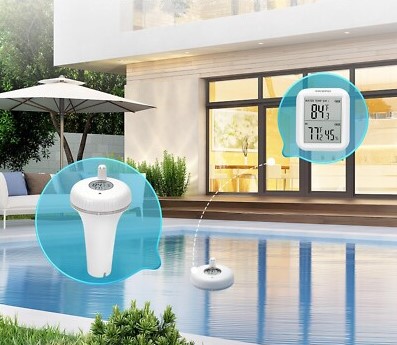
These self-contained floating capsules house precision thermistors inside corrosion-resistant housing, often featuring integrated solar panels for continuous power.
-
Best used for: Retrofit installations where drilling into plumbing lines is impossible.
-
Materials: Look for UV-stabilized ABS plastic with double O-ring silicone seals rated to at least IP68 ingress protection.
2. In-Line Probes & Well Sensors
Installed directly into the return PVC pipe network at the equipment pad, these sensors read water temperature as it flows back into the pool basin.
-
Best used for: Advanced smart home automation and automated salt-chlorine generation systems.
-
Materials: Marine-grade 316 stainless steel or titanium probes housed in schedule 80 PVC tees to prevent chemical degradation.
Integrating Telemetry with Smart Home Automation
The real power of a smart pool thermometer isn’t just reading temperatures on your smartphone screen—it’s triggering automated physical actions across your facility.
[ Smart Pool Thermometer ]
           ||
           || (Real-time Temp Trigger)
           \/
[ Smart Home Hub / Automation Controller ]
      //                        \\
     // (Temp < Target)          \\ (Temp >= Target)
     \/                          \/
[ Turn ON Heat Pump /      [ Turn OFF Heater /
  Activate Solar Cover ]      Engage Eco Mode ]
By connecting your sensor data to platforms like Home Assistant, Apple HomeKit, or proprietary pool controllers, you can establish automated logic loops:
-
Solar Heating Efficiency: Automatically trigger your solar booster pump only when the pool temperature drops below $80^\circ\text{F}$ AND solar roof collectors exceed $100^\circ\text{F}$.
-
Chemical Dosing Protection: Saltwater chlorinators struggle to generate chlorine in water below $60^\circ\text{F}$. Automate winterization routines or adjust dosing schedules dynamically based on live water temp.
-
Thermal Blanket Management: Receive automatic alerts on your smartphone reminding you to roll out your solar cover when ambient night temperatures threaten to drop below water temp.
Step-by-Step Installation Protocol
Deploying your connected thermometer correctly ensures maximum telemetry precision and extends hardware lifespan.
Step 1: Pre-Pairing & Gateway Setup
Always pair your smart pool thermometer with its indoor bridge or Wi-Fi network inside your house near the router before bringing it out to the pool deck. Debugging connectivity issues indoors is far easier than doing it while kneeling on hot pavers!
Step 2: Calibrate the Internal Sensor
Fill a bucket with a mixture of ice and tap water, letting it sit for 10 minutes to stabilize at $32^\circ\text{F}$ ($0^\circ\text{C}$). Submerge your sensor probe to verify calibration. Use your app’s offset adjustment settings if the reading strays by more than $0.5^\circ\text{F}$.
Step 3: Strategic Anchor Placement
If using a floating node, anchor it near the pool skimmer intake using a nylon cord—never let it drift freely near returns or waterfalls. Placing the node near fresh water inlets will distort your readings with unmixed, heated, or cooled water.
[ Step 1: Indoor Pre-Pair ]          [ Step 2: Ice Bath Calibration ]
  Set up hub near router               Verify $32^\circ\text{F}$ standard
+---------------------------+        +---------------------------+
| Pair hardware inside home | ====>  | Set software offset value |
| Verify firmwire updates   |        | inside companion app      |
+---------------------------+        +---------------------------+
Pro Tips
Pro Tip: Thermal Stratification Breaker
Still water naturally separates into hot surface layers and freezing bottom layers, causing floating sensors to register artificially high readings. Program your main filtration pump to run at low speeds during peak afternoon hours. Circulating the water mass guarantees that your smart pool thermometer samples a truly mixed, uniform water column.
The Chemical Fog Trap
High concentrations of chlorine or acid near skimmer baskets can breach lower-grade rubber seals, corroding delicate lithium batteries and circuit boards within months. Never anchor your floating sensor directly inside the skimmer basket or directly adjacent to a floating chemical dispenser! Always maintain at least a 5-foot clearance from chemical insertion points.
Mastering Outdoor Facility Telemetry
Modern outdoor living spaces are no longer isolated structures—they are fully integrated, intelligent facilities that demand precision control. Upgrading to a dedicated smart pool thermometer bridges the gap between raw outdoor elements and refined, energy-efficient comfort. By automating your thermal tracking, you eliminate guesswork, extend your swimming season, and protect your hardware investment for years to come.
How are you currently managing and monitoring your pool’s thermal performance? Have you experienced high heating bills or Wi-Fi range challenges with your outdoor smart devices? Drop your thoughts, questions, and setup photos in the comments below—I’d love to help you optimize your backyard system!








+ There are no comments
Add yours